Amazing Full-screen Blogger Websites
Shuttershot: Terrific Full-screen Photo-blog!
Shuttershot Template Download
Showing posts with label How To. Show all posts
Showing posts with label How To. Show all posts

Video for Everybody
Video for Everybody ("VfE") is a nifty HTML5 player implementation using an embedded Youtube player as the fall-back Flash player. VfE does not need javascript and vids will display across all browsers. However, without javascipt menu control is inconsistent across different platforms.
Notes:
a. The original vid is 640x360 -I can't amend the dimension to fit my page width. When W=600px the vid don't play. If the vid is to fit nicely on the page or vid box (width=600px) your vid dim must follow the same aspect ratio and have the same H and W as the vid box dim, a parameter you control if you produce your own vid. So what to do? Well, I adjusted the page width instead! * hehehe * Width adjustment is easy if you use a standard Blogger template. Solved: 11-Feb-12.
b. If the parameter 'autoplay' is included in the vid tag the vid will play automatically when you open the page. Omit it if you don't want that event.
Notes:
a. The original vid is 640x360 -
b. If the parameter 'autoplay' is included in the vid tag the vid will play automatically when you open the page. Omit it if you don't want that event.
Download Video: Closed Format: "MP4" Open Format: "OGG" / "WebM"
Recover deleted postsBlogger Pencil Edit Icon Goes Missing !
Note: This is also posted on my other Greencoal blogs, useful for reference as I do edits on these other blogs too.
Bloggers find the blog post quick edit icon and wrench a great time-saver when they edit their blog. However, each time Firefox is upgraded the blog post edit pencil icon goes missing! * Arrggh * There are several causes, amongst which are possibly the anti-virus software setting. Example: in FF9 I investigated and switched off website filtering, and the pencil icon was restored on my blog posts! Other times it could be a security setting in your browser. The article below is a good read on the issue:
Blogger-edit-pencil-missing
UPDATE: 02-Feb 2012
I upgraded to FF ver 10 last nght, and sure enough, the pencil icon went awry! I tried the previous tweak but it did not work.
After spending the better part of the day googling and investigating the possible myriad causes, including resetting browser preferences, none of which worked, I decided to see what would happen if I closed and shutdown my anti-virus software.
After shutting down the AV program I closed firefox and re-open the browser again. And lo and behold - the pencil icon was restored! So my anti-virus program (always) was the culprit. But didn't I disable web-filtering in the anti-virus program? Yes, I did - but that didn't restore the pencil or edit wrench icon! I needed to shutdown the anti-virus program to restore the pencil icon. I also re-activated the anti-virus program; the edit-pencil icon still shows on the blog! Good.
To re-check, I shut down Firefox and re-open it again. The pencil icon still shows! Somehow, somewhere, something was broken in the AV program setting. Shutting it down and re-opening it was the only way to restore its setting and the pencil edit icon.
UPDATE: 26-Mar-12
Another cause of missing pencil icon is your browser privacy setting. Click on the wrench icon at the top right corner to access the Options page of Google Chrome. Next click on Under the Hood -> Content settings... and check 'Allow local data to be set (Recommended)' on the Cookies page. Close the Options page, refresh browser and the pencil icon should reappear.
Bloggers find the blog post quick edit icon and wrench a great time-saver when they edit their blog. However, each time Firefox is upgraded the blog post edit pencil icon goes missing! * Arrggh * There are several causes, amongst which are possibly the anti-virus software setting. Example: in FF9 I investigated and switched off website filtering, and the pencil icon was restored on my blog posts! Other times it could be a security setting in your browser. The article below is a good read on the issue:
Blogger-edit-pencil-missing
UPDATE: 02-Feb 2012
I upgraded to FF ver 10 last nght, and sure enough, the pencil icon went awry! I tried the previous tweak but it did not work.
After spending the better part of the day googling and investigating the possible myriad causes, including resetting browser preferences, none of which worked, I decided to see what would happen if I closed and shutdown my anti-virus software.
After shutting down the AV program I closed firefox and re-open the browser again. And lo and behold - the pencil icon was restored! So my anti-virus program (always) was the culprit. But didn't I disable web-filtering in the anti-virus program? Yes, I did - but that didn't restore the pencil or edit wrench icon! I needed to shutdown the anti-virus program to restore the pencil icon. I also re-activated the anti-virus program; the edit-pencil icon still shows on the blog! Good.
To re-check, I shut down Firefox and re-open it again. The pencil icon still shows! Somehow, somewhere, something was broken in the AV program setting. Shutting it down and re-opening it was the only way to restore its setting and the pencil edit icon.
UPDATE: 26-Mar-12
Another cause of missing pencil icon is your browser privacy setting. Click on the wrench icon at the top right corner to access the Options page of Google Chrome. Next click on Under the Hood -> Content settings... and check 'Allow local data to be set (Recommended)' on the Cookies page. Close the Options page, refresh browser and the pencil icon should reappear.
The Wait is Over

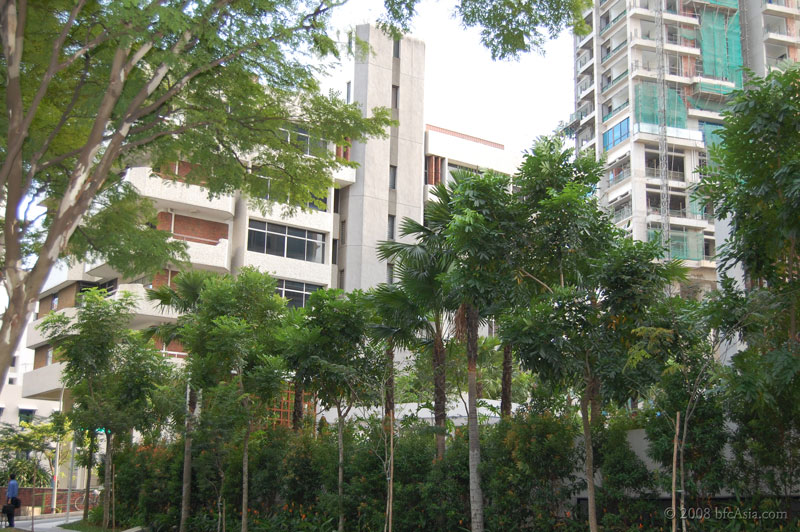


It's done.
Finally, after a period of 15 months, my beloved residence at Mayer Mansion has been sold en-bloc. Our new abode is a lovely cozy 4-room HDB resale flat three floors above Tek-kha market, just a hop from the Little India MRT Station! How's that for convenience!
Why did it take so long to sell our apartment?
..hmmm...I will probably write an insider's story on the Mayer Mansion en-bloc saga one day because as chairman of the Building Managment Corporation I also chaired the Enbloc Sales Committee.
For now, however, it's back to doing what I like best: shooting pictures!
Blog Video Player
Related Posts:
1 Blog Video Player
2 Video for Everybody - Kroc Carmen
3 Concluding Remarks - Final Choice of Blog Video Player
Most blogs embed the Youtube player to publish videos on their blog. Problem is, that player publishes videos that are hosted on Youtube. What if I wish to showcase my own video production on my Blog? To do that I would first need to publish my video on Youtube, then embed the Youtube player (linked to my video) on the blog page, a tedium at best. * yawn * I don't need to do that if I have my own video-player widget on my blog. Hence this post to test the concept. And it works !
Now I have the best of both worlds: my own video for readers of this Blog only or publish the video on Youtube if I need to attract a bigger audience. Independence does make you feel good, doesn't it? * grin *


Here's the implementation : Echo - We Are Here!
Issues : This will be a continual update as more issues are found..
a. To play the video in full screen, hit the full-screen icon at the bottom right corner of the video box. Hitting the [ESC] key will return you to the blog page. That works in Google Chrome and IE9 but not in Firefox due to cross-platform inconsistencies. If you use Firefox please right-click and select Full-screen to play the video full-screen.
b. Why do you omit ogg format? Only 2 formats - mmp4 & webM - are served, voiding the need to convert mp4 to ogg, saving conversion time and DropBox folder space. I omitted ogg to see if FF will play webM. Apparently FF ver 10 does play webM but not mp4 yet. Maybe I should i/c ogg for those using ff 9 and below? hmmm...Seems vid fallback to Flash is not needed if only using Chrome, FF, or IE9 as this vid will play on these platforms.
c. Why don't you i/c Flash fallback? I could. Problem is, vid controls are inconsistent across platforms as the Flash player has a different menu bar and the goal is to achieve consistent cross-platform performance as much as possible. My post Video for Everybody shows the menu control using a Flash fallback (youtube player) and no javascript is used. So, some trade-off here.
d. Why then don't you use VfE exclusively? I could. Problem is, without javascript the menu control is inconsistent across different platforms.
e. Video volume level may be adjusted, either on the video control-bar or via the external volume control of the PC speaker.
f. In IE9 some elements on the blog page overlay the video when you play it in full-screen mode. That ruin the presentation somewhat. Still no luck trying to figure out what causes the overlay in IE9. As the issue occur only for this vid player but not in Youtube embedded vids, the problem has to be either HTML5, the Flash player used, the vid menubar control or some incorrect setting. Note that this video displays properly without any disturbing overlay element in Firefox or Chrome browser. Any ideas, anyone?
UPDATE 08-Feb-12: My AV probably is the culprit, figuring out which setting causes the problem in IE9 and not in the other browser platforms. Turned off AV web filter. Issue solved in blog DC.
UPDATE 09-Feb-12: Arrgghh.. although blog DC doesn't surface the overlay issue now I discovered blogs Shunfoto ("SF") and Forgive Me Lord ("FML") still do. More testing - probably has to do with the CSS code in SP and FML? * sigh *.
g. Why does the video takes some time to load? If you're not using high-speed broadband the video will take >5 sec to load. Other factors are also involved - available bandwidth, congestion, etc. I converted all my vids to full HD format - resolution 1920x1200, 3-4 min run time, 35MB file size - because bigger file sizes and Full HD is the future. Owing to their much larger file sizes, full HD vids take longer to load than SD videos. If your bandwidth is not up to it the video will stutter in the first few seconds. After that play should be smooth, hopefully. * grin *
If you're not on the nationwide fibre-optic network, I suggest you get a subscription plan. Superspeed fibre broadband is now price competitive to Singtel's ADSL or Starhub's Cable broadbands. I'm on M1 paying $39 pm (promotional offer) for download and upload speed of upto 50Mbps. Even as I write, ultra-speed fibre broadband is becoming available in many countries today. Ultra-speed broadband will become the de-facto standard as more people ( i.e. congestion ) get on the Internet and multimedia continues to hog the screen - be it on the desktop PC, iPad, iPhone, Ultrabooks. Gasp! Yes, even become mainstream on the living room TV as multimedia technologies converge and merge. TV as we know it today will no longer exist - the Internet is the new TV. That's the new paradigm.
Already the next exciting prospect for multimedia is here: Thunderbolt, the blazingly fast file transfer and streaming made possible by Intel's latest innovation announced last year and is expected to be in the market some time in 2012! Apple had a minor role in Thunderbolt and already launched new Thunderbolt-equipped devices in Dec 2011!
Incidentally, Thunderbolt is also a paradigm shift, spawning new devices and technologies and changing the PC industry. It will make today's PC obsolete. PCs will come modular, heat inside the new PC will no longer be an issue as power, graphics, etc will become externalized. That allows higher clock-speeds and processing power and everything will shrink. Graphics will either be enshrined in the CPU or be externalized, the new PC will take tablet form with built-in screen - like the iPAD - but will be as powerful as desktop PCs today. Storage of programs, data, etc using the Cloud will be pre-dominant, obviating the need for local hard disks on the new PC which will be equipped with light weight (modular or built-in) SSDs. All these technologies are already here, Thunderbolt will tie all these disparate technologies together to make possible the new format, perhaps as soon as within 3-5 years.
Everything will go on the Net - healthcare, education, homework, officework, entertainment, police patrols, security survillence, home automation, etc. Internet hotspots will proliferate, merge, become ubiquitous. Entire communities will have free access to public broadband networks when governments ( yes, free access except Singapore * wink-wink * ) realize the Net is the new TV to communicate with the masses. Books, bookstores, newspapers, magazines, public libraries will be obsolete - as dead as the Dodo. That is the future - and ultra-speed broadband is an indispensable cog in that future.
I didn't hesitate to subscribe when fibre-optic broadband became available in Singapore in 2010. I assume most of you are already on the highspeed bandwagon because - like me - you saw how enjoyable and good Youtube vids really are in full HD glory!
Update 08-Feb-12: Google lays new fibre-optic cable for Super-Fast Internet. Read here.


Related Posts:
1 Blog Video Player
2 Video for Everybody - Kroc Carmen
3 Concluding Remarks - Final Choice of Blog Video Player
1 Blog Video Player
2 Video for Everybody - Kroc Carmen
3 Concluding Remarks - Final Choice of Blog Video Player
Most blogs embed the Youtube player to publish videos on their blog. Problem is, that player publishes videos that are hosted on Youtube. What if I wish to showcase my own video production on my Blog? To do that I would first need to publish my video on Youtube, then embed the Youtube player (linked to my video) on the blog page, a tedium at best. * yawn * I don't need to do that if I have my own video-player widget on my blog. Hence this post to test the concept. And it works !
Now I have the best of both worlds: my own video for readers of this Blog only or publish the video on Youtube if I need to attract a bigger audience. Independence does make you feel good, doesn't it? * grin *
Here's the implementation : Echo - We Are Here!
Issues : This will be a continual update as more issues are found..
a. To play the video in full screen, hit the full-screen icon at the bottom right corner of the video box. Hitting the [ESC] key will return you to the blog page. That works in Google Chrome and IE9 but not in Firefox due to cross-platform inconsistencies. If you use Firefox please right-click and select Full-screen to play the video full-screen.
- Update 5-Feb-12 : That is no longer true. As of today the full-screen icon is now shown at the bottom right corner of the vid box.
b. Why do you omit ogg format? Only 2 formats - mmp4 & webM - are served, voiding the need to convert mp4 to ogg, saving conversion time and DropBox folder space. I omitted ogg to see if FF will play webM. Apparently FF ver 10 does play webM but not mp4 yet. Maybe I should i/c ogg for those using ff 9 and below? hmmm...Seems vid fallback to Flash is not needed if only using Chrome, FF, or IE9 as this vid will play on these platforms.
c. Why don't you i/c Flash fallback? I could. Problem is, vid controls are inconsistent across platforms as the Flash player has a different menu bar and the goal is to achieve consistent cross-platform performance as much as possible. My post Video for Everybody shows the menu control using a Flash fallback (youtube player) and no javascript is used. So, some trade-off here.
d. Why then don't you use VfE exclusively? I could. Problem is, without javascript the menu control is inconsistent across different platforms.
e. Video volume level may be adjusted, either on the video control-bar or via the external volume control of the PC speaker.
f. In IE9 some elements on the blog page overlay the video when you play it in full-screen mode. That ruin the presentation somewhat. Still no luck trying to figure out what causes the overlay in IE9. As the issue occur only for this vid player but not in Youtube embedded vids, the problem has to be either HTML5, the Flash player used, the vid menubar control or some incorrect setting. Note that this video displays properly without any disturbing overlay element in Firefox or Chrome browser. Any ideas, anyone?
UPDATE 08-Feb-12: My AV probably is the culprit, figuring out which setting causes the problem in IE9 and not in the other browser platforms. Turned off AV web filter. Issue solved in blog DC.
UPDATE 09-Feb-12: Arrgghh.. although blog DC doesn't surface the overlay issue now I discovered blogs Shunfoto ("SF") and Forgive Me Lord ("FML") still do. More testing - probably has to do with the CSS code in SP and FML? * sigh *.
g. Why does the video takes some time to load? If you're not using high-speed broadband the video will take >5 sec to load. Other factors are also involved - available bandwidth, congestion, etc. I converted all my vids to full HD format - resolution 1920x1200, 3-4 min run time, 35MB file size - because bigger file sizes and Full HD is the future. Owing to their much larger file sizes, full HD vids take longer to load than SD videos. If your bandwidth is not up to it the video will stutter in the first few seconds. After that play should be smooth, hopefully. * grin *
If you're not on the nationwide fibre-optic network, I suggest you get a subscription plan. Superspeed fibre broadband is now price competitive to Singtel's ADSL or Starhub's Cable broadbands. I'm on M1 paying $39 pm (promotional offer) for download and upload speed of upto 50Mbps. Even as I write, ultra-speed fibre broadband is becoming available in many countries today. Ultra-speed broadband will become the de-facto standard as more people ( i.e. congestion ) get on the Internet and multimedia continues to hog the screen - be it on the desktop PC, iPad, iPhone, Ultrabooks. Gasp! Yes, even become mainstream on the living room TV as multimedia technologies converge and merge. TV as we know it today will no longer exist - the Internet is the new TV. That's the new paradigm.
Already the next exciting prospect for multimedia is here: Thunderbolt, the blazingly fast file transfer and streaming made possible by Intel's latest innovation announced last year and is expected to be in the market some time in 2012! Apple had a minor role in Thunderbolt and already launched new Thunderbolt-equipped devices in Dec 2011!
Incidentally, Thunderbolt is also a paradigm shift, spawning new devices and technologies and changing the PC industry. It will make today's PC obsolete. PCs will come modular, heat inside the new PC will no longer be an issue as power, graphics, etc will become externalized. That allows higher clock-speeds and processing power and everything will shrink. Graphics will either be enshrined in the CPU or be externalized, the new PC will take tablet form with built-in screen - like the iPAD - but will be as powerful as desktop PCs today. Storage of programs, data, etc using the Cloud will be pre-dominant, obviating the need for local hard disks on the new PC which will be equipped with light weight (modular or built-in) SSDs. All these technologies are already here, Thunderbolt will tie all these disparate technologies together to make possible the new format, perhaps as soon as within 3-5 years.
Everything will go on the Net - healthcare, education, homework, officework, entertainment, police patrols, security survillence, home automation, etc. Internet hotspots will proliferate, merge, become ubiquitous. Entire communities will have free access to public broadband networks when governments ( yes, free access except Singapore * wink-wink * ) realize the Net is the new TV to communicate with the masses. Books, bookstores, newspapers, magazines, public libraries will be obsolete - as dead as the Dodo. That is the future - and ultra-speed broadband is an indispensable cog in that future.
I didn't hesitate to subscribe when fibre-optic broadband became available in Singapore in 2010. I assume most of you are already on the highspeed bandwagon because - like me - you saw how enjoyable and good Youtube vids really are in full HD glory!
Update 08-Feb-12: Google lays new fibre-optic cable for Super-Fast Internet. Read here.
Related Posts:
1 Blog Video Player
2 Video for Everybody - Kroc Carmen
3 Concluding Remarks - Final Choice of Blog Video Player
Personalize your Home with Beautiful Portraits
My dear wife is an avid photographer. And a huge fan of Kym Ng. She was at Marina Bay when she snapped this photo of Kym Ng on-the-spur-of-the-moment. She had no time to compose or move around for the best angle. Nor could she wait for better lighting, expression or mood. She simply snapped, snapped, snapped. And hoped for the best.
Well, this particular shot showed Kym at her effervescent best! Her personality shines through in this photo. Kym's beautiful eyes seem to connect and communicate with you, don't they?
Now, many photographers would process the image employing the usual digital imaging techniques and photo-processing skills. And the result is shown below:

"Ooooh, sweet!!" was how our friends reacted when they laid eyes on the above photo. They found the processed photo refreshing, endearing and more than good enough for the Album. Some suggested blowing up the photo 24-inch by 30-inch and wall-mount it as a beautiful framed art print on the wall.
And why not? A piece of photo art for the family home. An art piece that captures Kym's persona as we all know and love. Forever, frozen in time. It's better than some purchased art pieces that we admire but couldn't connect emotionally. No visceral impact.
But hey - we're not your run-of-the-mill photographers! So we wondered and mused, "What can we do to bring out Kym's sparkling personality more? Her irrepressible personality that defines her? Can we do better than most photographers?"
After tweaking various elements here and there, making fine adjustments visually and carefully, often stepping back after hours of work to view the work-in-progress, then changing the parameters all over again, we finally achieved the smouldering, alluring look of a classic beauty that all photographers strived to capture:

Well, what do you think? Do you think we have done justice to Kym's persona, making this print truly one-in-a-million?
The original snapshot

Go to Photo Gallery or Design Challenges blog
Well, this particular shot showed Kym at her effervescent best! Her personality shines through in this photo. Kym's beautiful eyes seem to connect and communicate with you, don't they?
Now, many photographers would process the image employing the usual digital imaging techniques and photo-processing skills. And the result is shown below:
"Ooooh, sweet!!" was how our friends reacted when they laid eyes on the above photo. They found the processed photo refreshing, endearing and more than good enough for the Album. Some suggested blowing up the photo 24-inch by 30-inch and wall-mount it as a beautiful framed art print on the wall.
And why not? A piece of photo art for the family home. An art piece that captures Kym's persona as we all know and love. Forever, frozen in time. It's better than some purchased art pieces that we admire but couldn't connect emotionally. No visceral impact.
But hey - we're not your run-of-the-mill photographers! So we wondered and mused, "What can we do to bring out Kym's sparkling personality more? Her irrepressible personality that defines her? Can we do better than most photographers?"
After tweaking various elements here and there, making fine adjustments visually and carefully, often stepping back after hours of work to view the work-in-progress, then changing the parameters all over again, we finally achieved the smouldering, alluring look of a classic beauty that all photographers strived to capture:
Well, what do you think? Do you think we have done justice to Kym's persona, making this print truly one-in-a-million?
The original snapshot
Go to Photo Gallery or Design Challenges blog
Your Wedding Photo as Art
All of us have our favorite wedding photo. Use that as wall art to personalize your home. Simply blow up the photo, choose a nice frame to complement the photo - and there you have it, a wonderful piece of art for the family home!
But what if your favorite wedding photo turned out to be less-than-suitable and cannot be used? Like the one below:

The Groom looked worn-out, exhausted. Not-looking-at-the-top-of-the-world! "The Couple looked better in real life!" - you probably heard that a lot too. Yes - weddings are high-pressure, exciting, surrealistic events. Only when it was all over did the Couple wake up and really felt it wasn't a dream. No wonder the Groom looked frazzled! And the photo did not lie. Captured in all its unedited unfettered glory - the mousta`che, the perspiration, the tiredness and anxieties. Sigh.. another favorite photo consigned to the "Banned Bin".
Pity, everyone agreed the photo was easily amongst the best in the Collection. The Couple's pose and expression said it all. The Groom remarked he liked the way his lovely Bride pressed her body close to him. No one had urged her to do that. It was all so natural, so spontaneous. Asked if we could use our digital imaging skills to redeem the photo, we said we would give it our best shot.
When we got the photo, we saw the Warmth, the Love, the Spontaneity. Yes, that would be our focus! Bring out the ethereal quality hidden in the image. Took us all of two weeks, tweaking dozens of elements. Re-doing and re-working numerous parameters. Until we got the freshness and sparkle we wanted. Then, when we thought we had nailed it, we noticed the groom's sun-burnt nose! Obviously he had just completed his army stint and the nose showed! More tweaking followed. Another week went by. Then, ahh.. more tweaks to the skin tone. There must be the right touch of color to the faces, not too light, not too dark. Finally, we showed the finished artwork to the Bride:

"Wow.. what a difference! This will be our showpiece, framed and wall-mounted for the Living Room," she uttered, all teary and ecstatic. Yes, the groom now looks fresh, clean, vibrant! Nicely complemented by the radiant Bride! He smiled sheepishly and shook our hand.
Their reaction spoke more eloquently than anything we could say !
Return to Design Challenges blog or go to Photo Gallery
But what if your favorite wedding photo turned out to be less-than-suitable and cannot be used? Like the one below:
The Groom looked worn-out, exhausted. Not-looking-at-the-top-of-the-world! "The Couple looked better in real life!" - you probably heard that a lot too. Yes - weddings are high-pressure, exciting, surrealistic events. Only when it was all over did the Couple wake up and really felt it wasn't a dream. No wonder the Groom looked frazzled! And the photo did not lie. Captured in all its unedited unfettered glory - the mousta`che, the perspiration, the tiredness and anxieties. Sigh.. another favorite photo consigned to the "Banned Bin".
Pity, everyone agreed the photo was easily amongst the best in the Collection. The Couple's pose and expression said it all. The Groom remarked he liked the way his lovely Bride pressed her body close to him. No one had urged her to do that. It was all so natural, so spontaneous. Asked if we could use our digital imaging skills to redeem the photo, we said we would give it our best shot.
When we got the photo, we saw the Warmth, the Love, the Spontaneity. Yes, that would be our focus! Bring out the ethereal quality hidden in the image. Took us all of two weeks, tweaking dozens of elements. Re-doing and re-working numerous parameters. Until we got the freshness and sparkle we wanted. Then, when we thought we had nailed it, we noticed the groom's sun-burnt nose! Obviously he had just completed his army stint and the nose showed! More tweaking followed. Another week went by. Then, ahh.. more tweaks to the skin tone. There must be the right touch of color to the faces, not too light, not too dark. Finally, we showed the finished artwork to the Bride:
"Wow.. what a difference! This will be our showpiece, framed and wall-mounted for the Living Room," she uttered, all teary and ecstatic. Yes, the groom now looks fresh, clean, vibrant! Nicely complemented by the radiant Bride! He smiled sheepishly and shook our hand.
Their reaction spoke more eloquently than anything we could say !
Return to Design Challenges blog or go to Photo Gallery
Subscribe to:
Posts (Atom)